Tuesday, September 29, 2009

Toshiba' Slim T100 Series Gains Windows 7

Windows 7With the anticipated launch of Windows 7, we are seeing a ton of new laptops coming out that already have Windows 7 integrated into them. Toshiba has just launched a new line of slim laptops entitled the T100 series. Toshiba has unveiled two new laptops for the T100 series, the 13.5-inch T135 and the 11.6-inch T115. Each device is less than one inch thick with multi-touch touchpads and LED backlight displays.

One new feature included in the T100 series, as well as most of the recent Toshiba laptops, is the extremely useful sleep-and-charge feature. The sleep-and-charge feature lets you connect an iPod or other device to the USB port to allow you to charge them even if the system is in sleep mode or off.

These two devices have some nice specs about them. The T115 comes with your choice Toshiba T115 of an Intel Pentium processor SU4100 or Intel Celeron processor 7435 and a starting 250GB (5400 RPM) HDD7 disk with up to 4GB of memory. The T115 also has Windows 7 Home Premium OS, eSATA/USB combo port with USB Sleep-and-Charge, 1 HDMI port, built-in webcam with Toshiba Face Recognition, stereo speakers, microphone, 5-in-1 memory card reader slot, Toshiba Hard Drive Impact sensor, 802.11 b/g/n wireless 8 10/100 Ethernet, a 6-cell battery with up to 9hrs of charge and an 11.6-inch diagonal widescreen HD TruBrite LED Backlit display. All of this comes in at around $450.

The T135 comes with your choice of an Intel Pentium SU4100 processor or Intel Toshiba T135Pentium SU2700 and a starting 250GB (5400 RPM) HDD disk with up to 8GB of memory. The T135 also has Windows 7 Home Premium OS, eSATA/USB combo port with USB Sleep-and-Charge, 1 HDMI port, built-in webcam with Toshiba Face Recognition, stereo speakers, microphone, 5-in-1 memory card reader slot, Toshiba Hard Drive Impact, 802.11 b/g/n wireless and 10/100 Ethernet, a 6-cell battery with up to 9hrs of charge and a 13.3-inch diagonal widescreen HD TruBrite LED Backlit display. The T135 is a little more expensive than the T115 coming in at around $600.
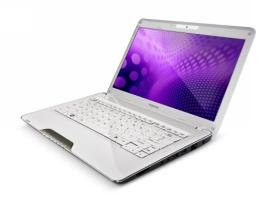
With the release of Windows 7 growing ever nearer, we can expect most laptops coming out in the future to be equipped with Windows 7 and if Windows 7 delivers even some of what it promises then we can all be excited. You can pick up both the T115 and the T135 on October 22, 2009.

Wednesday, September 16, 2009

HP's Envy: 13 & 15 Inch Laptops

HP's Envy: 13 & 15 Inch Laptops

Hewlett Packard's new "Envy" line of laptops is sleek and stylish, and according to PC World, looks a lot like Apple's MacBook Pro line.

The 13.1 inch model or the "Envy 13" has a sharp 1366 x 768 pixel screen and lots of power for its small frame. For $1700, you get a 1.86GHz Intel Core 2 Duo SL9400 CPU with 3GB of RAM (including an extra DIMM slot), plus a 512MB ATI Mobility Radeon HD 4330 GPU. For low-end tasks, the laptop throttles the GPU and shifts down to the integrated Intel GPU, extending battery life.

The thin 12.6 x 8.5 x 0.8 inch frame contains a 250 GB had drive and an external 8x DVD-RW drive. It provides two batteries: the standard four-cell battery along with a thinner six-cell battery that sits underneath it. It supposedly has enough power to handle the 64-bit version of Windows 7.

The comfortable keyboard and mouse are backed up by a series of quick-access multimedia buttons along with an "Instant On" feature for browsing the web and playing multimedia files. The laptop also features two USB ports, 802.11n, optional Bluetooh, HDMI-out and a combination headphone/microphone jack that is also suitable for a cell phone headset.

There is also an Envy 15 in the works, but HP hasn't been quick to release the details. What is known is that the machine is a 15-inch model, weighs 5.18 pounds, and will feature a "Future Intel Core i7 Processor" with up to 16GB of DDR3 RAM and 1 GB discrete ATI Mobility Radeon HD 4830. That laptop will retail at $1799. More details will be released at next week's Intel Developer's Forum.

Both the Envy 13 and the Envy 15 will go on sale October 18, just in time for the holiday season.

Sunday, September 13, 2009

Crossing the Border? Leave Your Laptops at Home

Crossing the Border? Leave Your Laptops at Home
Last week, the Department of Homeland Security (DHS) issued some new rules regarding what border officials can and can't do with your laptops and any other electronic media storage device. Despite a lawsuit from the ACLU, the rules are very similar to those put in place by the Bush administration with a few slight changes. According to the DHS website, the rules will "enhance transparency, accountability and oversight of electronic media searches at U.S. ports of entry and includes new administrative procedures designed to reflect broad considerations of civil liberties and privacy protections."

Either way, border officials can still seize and search your laptop, MP3 player, or flash drives without warning and can look at any file on it without reason. The new rules require those performing the search to keep the item for no longer than a 30 day period and keep laptop owners informed of the search's progress. The Association for Corporate Travel Executives (ACTE) has said they believe border officials make images of the laptops' hard drive and return the laptops to their owners by mail, with copied files being stored for an indefinite amount of time.

In any event, if you are traveling beyond the border, there are a few ways to be prepared, just in case your laptop is seized. Chances are, if you're traveling for business or even for pleasure, there are files on your computer that will need while on your trip. Here are some ways to avoid being stuck without important information:

  • This is a no-brainer, but store your files in multiple locations. Take advantage of external drives and discs, or even an internet-based storage system such as Google Docs that will allow you to access information anytime, anywhere.

  • If the information stored on your laptop is pertinent to your job, make sure you inform border agents verbally and if possible, in writing. According tot he ACTE, this will help you retain more legal rights.

  • Consider a Laptop Rental. By renting a laptop and having it delivered to your destination, you'll avoid the hassle of dealing with the issue all together, have one less piece of equipment to carry on your trip, and you won't risk unexpected loss or damage that might occur during any type of search and seizure.
According to PCWorld, only 46 laptops have been subject to seizure in the last ten months, but it's always better to be safe than sorry!

Monday, September 7, 2009

New Apple Tablet

New Apple Tablet

Steve Jobs is back to work at Apple, just months after having a liver transplant, and sources say he is spending most of his time focused on the company's new tablet device. According to the Wall Street Journal, the team of people working on the tablet are under much scrutiny from their company's CEO. The article also states that this is the third attempt at the tablet, the first one failed due to a low battery life, the second one due to insufficient memory. Jobs, himself, has confirmed that most of that information is correct, but didn't specify any details. There is still no word on when an Apple tablet might actually become available to the public or what kind of impact it will have but if the success of Jobs' last pet project - the iPhone - is any indication, the tablet could change the way many people view technology.


There have been many rumors about the Apple tablet in recent months. Some say a September unveiling is in the works, others say November and some say not until 2010. A report from Barron's claims the device will be marketed for mostly media play (with an Apple TV tie-in) and gaming. Regardless of when and what, there is no doubt the rest of the industry is waiting to see what exactly Jobs and Apple have planned.

Tuesday, September 1, 2009

Netbook shipments growing at twice the rate of Notebooks


A newly released report from DisplaySearch shows a growing trend in the world of portable computers. In the 2nd quarter of 2009 netbooks had a net growth of 40%, while notebooks only grew 22%. To date netbooks now hold 22.2% of the portable computer market, its even more impressive when you compare that to the 2nd quarter just a year ago, when netbooks only accounted for 5.6% of the market.

Many factors could be playing into this surge. The bad economy which may be causing potential notebook buyers to rethink their needs and go with the cheaper, slimmer version. Netbooks also have been growing in popularity with promotions from companies like Verizon, Sprint, Comcast and Qwest offering discounted netbooks for new customers. The increase is also likely due to growing netbook sales in latin America and China, where new computer users and first time buyers may not need all the extra amenities that come with a notebook or desktop computer.

Tuesday, August 25, 2009

Nokia Booklet 3G


Nokia’s recently announced “Booklet 3G” was a big shocker for most of. My first impression of the netbook was that it looks very neat and it almost has the Macbook look to it. It weighs 2.7 lbs, and it is 2cm thick, and the all aluminum case to top it off. The new netbook is going to be running off of a 1.6Hz Intel Atom Z530. The netbooks screen is going to be 10.1’, with an impressive 12 hour battery life. The Booklet has built in HSDPA 3G, so you can expect the 3G connectivity to be very fast. The Booklet is Bluetooth enabled so no more taking wired microphones on the go. The Booklet also comes with Windows 7 Starter Edition pre-installed, which really surprised me because this is one of the first to offer Windows 7 on a netbook. The HDMI output allows you to plug into your TV in HD, and also lets you watch videos in 1080p. The Booklet comes with Assisted GPS and a swappable SIM card.

This netbook will be running at the high price of $799, I say the high price because, the RAM usage will double because it is running Windows 7, instead of Vista or even XP, so in my opinion you will not be getting the best performance from this computer. Which if all you are using the computer for is school work, office work, or browsing the internet, then this computer should be fine for all the basic needs. But I wouldn’t suggest downloading, playing high performance games or storing mass amounts of files, just because of the amount of RAM being used just to run windows 7. I would suggest this netbook for the “average” computer user, or as a gift for going back to school. This is definitely one of the most impressive netbooks I have seen so far. I am still very skeptical about how the overall performance of the computer will be. But it is definitely worth checking out; Nokia just set the standards for netbooks. The future is going to be interesting, seeing if their competitors like Dell can keep up with Nokia.


Specs:
  • Intel Z530 1.6Hz
  • 1GB RAM
  • 120GB Drive
  • A-GPS
  • Nokia Ovi Maps
  • Windows 7
  • Bluetooth Enabled
  • HSDPA 3G/ Wi-Fi
  • Swappable SIM
  • 12 Hour battery
  • HDMI output

Monday, August 17, 2009

Finding a Laptop for College

laptops for collegeAs the school year quickly approaches and parents and students begin the crazy time-consuming job of preparing everything to head off to college, a laptop is likely at the top of the shopping list. As a college student, I can definitely say that I don’t know where I would be without my laptop. I literally use it for absolutely everything. Whether I’m taking notes in philosophy class, writing a research paper for rhetoric, or just listening to music back in my dorm room, my laptop is constantly by my side.

The hard part in this situation is finding just the right laptop to suit all your college needs for the next four years or so. You don’t need crazy amounts of memory or hard drive space, but you do want a reliable, quick, easy to use laptop. In this guide to finding the perfect student laptop, I will try to cover all the basics you’ll need to know before heading out to your local Best Buy or Circuit City to begin the hunt.

Ok, so the first aspect we’re going to consider is the design. You’re probably going to be lugging your laptop all over campus with you so you are not going to want it to be super heavy. One easy way to minimize the total weight of the laptop is to get a smaller screen. Yeah its nice to have a big screen, but is it really necessary? I would recommend that you get a laptop with a screen that is no bigger than 14 inches. This way you still have a nice size screen, but you still have plenty of room in your backpack for your books and you won’t be weighed down by a really heavy piece of equipment.

Another important pat of the design of your future laptop is they keyboard. I personally feel that a full size keyboard is necessary. The whole point of having your laptop is to do research papers, essays, reports, and of course chat with your friends, so you’re going to be using the keyboard quite a bit. I feel like any keyboard that isn’t full size is just too cramped to do serious typing on. Having a full size keyboard, in my opinion, is worth even paying a little extra for if necessary.

Next we need to consider features. Recently, features that used to only be included on high-end laptops are now being featured on really cheap laptops too. Things like multiple USB ports, DVD burners, webcams, and media card readers are now coming standard on laptops priced around only $300. Concerning memory and hard dive space, I would say that the minimum would be 1GB of memory and 160GB of hard drive. Those are petty basic and can be found in most laptops.

Battery life is also an important part to consider when choosing your laptop. Having a long battery life is important if you plan on hauling your laptop around to all your classes to take notes. Most laptops will offer a battery option that you can choose from. Although it will add some weight, I would recommend always going with the bigger better battery.

The next step that you will be faced with once you’ve selected your perfect laptop will be concerning warranties. Most laptops are backed by a 1-year complimentary parts and labor warranty. The choice that you will have to make is whether to get an extended warranty past that first year. A standard warranty does not cover things such as spilled drinks or drops on the hard floor. For accidents such as these, you’ll have to take out a separate accident coverage plan. These warranties just keep adding up and can cost over $250 for maybe three years of coverage. I personally did not take out any sort of extended warranty and have been perfectly fine. I bought my laptop completely on my own, and I realize that if I ever endangered it or somehow destroyed it that I would be unable to afford to replace it. This fact makes me think twice before sitting my pop can down or tossing around my laptop.

Buying a laptop is something that you definitely shouldn’t do without first doing the proper amount of research. It’s a lot of money to put on the table, so you should consider all your options before making a commitment. Hopefully these tips and recommendation can give you a hand during your search for that perfect laptop. I wish you the best of luck during your hunt!